

If your KitchenAid Artisan Series 5 Quart Tilt Head Stand Mixer isn’t tilting back as it should, it can disrupt your baking routine and cause frustration. Fortunately, most issues are fixable with some simple troubleshooting steps. In this guide, you’ll learn the common causes behind a stuck tilt head and how to safely fix them, ensuring your mixer functions smoothly again.
Whether the tilt mechanism is jammed due to debris, misalignment, or a mechanical fault, we will walk you through practical, step-by-step solutions to get your mixer back in action without risking damage or injury.
Key Takeaways
| Common Cause | Mechanical obstructions or misaligned parts often cause the tilt head to stick. |
| Safety First | Always unplug your mixer before attempting repairs or maintenance. |
| Simple Fixes | Cleaning, lubrication, and checking for alignment can resolve most tilt-back issues. |
| When to Replace | Persistent mechanical failure may require professional repair or replacement parts. |
| Prevention Tips | Regular cleaning and gentle handling can prevent tilt head problems. |

KitchenAid Artisan Series 5 Quart Tilt Head Stand Mixer with Pouring Shield KSM150PS, Milkshake
Built to take it all on with the durable and built-to-last metal construction, and 59 touchpoints around the...
As an affiliate, we earn on qualifying purchases.
Identify the Cause of the Tilt Head Issue
Before attempting to fix your KitchenAid mixer, understand what might be causing the tilt head to stay in place. Common reasons include debris buildup, misalignment, or mechanical wear. Check if the tilt head is physically obstructed by food particles or residue, which can prevent it from moving freely. Also, inspect the hinge and tilt lock mechanism for signs of damage or misalignment. Recognizing the root cause helps in applying the right fix and avoiding unnecessary damage.
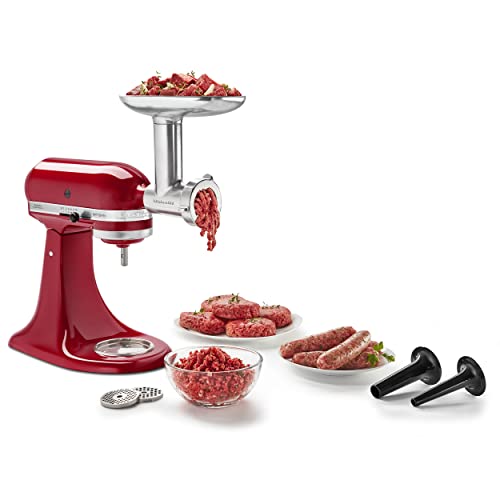
KitchenAid Stand Mixer Attachment, Food Grinder KSMMGA, Metal Food Grinder
Connect to any household KitchenAid Stand Mixer power hub and use the power of the motor to run...
As an affiliate, we earn on qualifying purchases.
Ensure Safety and Prepare Your Mixer
- Unplug your KitchenAid Artisan mixer completely from the power outlet to prevent accidental activation.
- Remove the mixing bowl and attachments for easier access to the tilt head area.
- Wear safety gloves if necessary, especially if cleaning or inspecting internal parts.
Safety is paramount. Never attempt repairs on a plugged-in appliance, and ensure the mixer is on a stable surface to prevent slips or falls during troubleshooting.
Clean Obstructions and Inspect Components
- Use a soft, damp cloth to wipe away any food residue or debris around the tilt hinge and lock mechanism.
- For stubborn grime, use a gentle brush or toothbrush to reach into crevices.
- Check the hinge pin and surrounding parts for signs of rust, damage, or misalignment.
- If you notice any debris lodged in the hinge, carefully remove it to restore free movement.
Keeping the hinge area clean prevents buildup that can cause sticking. Regular maintenance will extend the life of your mixer and maintain smooth operation.
Lubricate and Realign the Tilt Mechanism
- Apply a small amount of food-grade lubricant or silicone spray to the hinge pin and moving parts, following the manufacturer’s recommendations.
- Gently move the tilt head back and forth to distribute the lubricant evenly.
- If the head remains stuck, check if the hinge pin is properly aligned and seated correctly. Adjust it carefully if misaligned.
Proper lubrication reduces friction and prevents the tilt head from jamming. Avoid over-lubricating, which can attract dirt or cause messes.
Test the Tilt Function and Seek Professional Help
Once cleaned, lubricated, and realigned, plug your mixer back in and test the tilt head. Gently lift the head to see if it moves freely. If the head still won’t tilt back or you notice any unusual resistance or noises, it may indicate a mechanical failure or internal damage.
In cases of persistent problems, contact KitchenAid customer service or a professional appliance repair technician for further diagnosis and repairs. Avoid forcing the tilt head open, as this may cause further damage.
The Products in This Guide

KitchenAid Artisan Series 5 Quart Tilt Head Stand Mixer
- ✔ Voltage: 120V
- ✔ Warranty: 1 year limited
- ✔ Included Accessories: Pouring shield, flat beater

KitchenAid Stand Mixer Attachment
- ✔ Weight: 3.2 pounds
- ✔ Dimensions: 10 x 7 x 6 inches
- ✔ Warranty: 1 year
KitchenAid Artisan Series 5 Quart Tilt Head Stand Mixer
The KitchenAid Artisan Series 5 Quart Tilt Head Stand Mixer is built with durable metal construction and features 59 touchpoints for excellent mixing results. Its tilt-head design offers easy access to the bowl, making it convenient for various recipes. While generally reliable, users may encounter tilt-back issues caused by debris or mechanical misalignment, which can be fixed with proper cleaning and maintenance.
Pros:
- Sturdy metal construction
- Easy tilt-head access
- Multiple color options
- Powerful 10-speed motor
Cons:
- Tilt mechanism can jam or stick
- Requires regular cleaning
- Mechanical parts may wear over time
Best for: Home bakers and small-scale cooks who want a reliable, versatile stand mixer
Not ideal for: Heavy users with frequent heavy-duty mixing may need more industrial solutions
Bottom line: A durable, versatile mixer that benefits from regular maintenance to prevent tilt issues.
KitchenAid Stand Mixer Attachment
The KitchenAid Stand Mixer Attachment Food Grinder is a versatile tool that allows you to grind meats, vegetables, and more with ease. Connecting to the mixer’s power hub, it offers multiple grinding plates and sausage stuffer tubes. Ideal for home cooks wanting fresh, homemade ingredients, it complements the mixer well, especially if you frequently process food from scratch.
Pros:
- Multiple grinding plates
- Large food tray
- Easy to clean and store
- Enhances mixer functionality
Cons:
- Requires additional space
- Attachment sold separately
- Needs pre-chilling for best results
Best for: Food enthusiasts and home cooks who want fresh, custom-ground ingredients
Not ideal for: Those seeking a standalone grinder without a mixer
Bottom line: A robust attachment that boosts your mixer’s food processing capabilities.
Frequently Asked Questions
Why won’t my KitchenAid tilt head lift?
Common causes include debris buildup, misaligned hinge, or mechanical jamming. Following the cleaning and lubrication steps can often resolve the issue.
Is it safe to force the tilt head open?
No, forcing the tilt head can damage internal components. Always troubleshoot and fix the cause before attempting to lift.
How often should I clean the hinge and tilt mechanism?
Regular cleaning after every few uses helps prevent buildup. If you notice stiffness or sticking, clean and lubricate immediately.
Can I repair the tilt mechanism myself?
Basic cleaning and lubrication are DIY-friendly, but if parts are damaged or misaligned, consider professional repair or contacting KitchenAid support.
What should I do if my mixer still won’t tilt after troubleshooting?
If cleaning and lubrication don’t work, it may be a mechanical failure requiring professional repair or replacement parts. Contact KitchenAid customer service for assistance.
Keep Your Mixer Running Smoothly
With proper maintenance, your KitchenAid Artisan stand mixer can provide years of reliable service. Regular cleaning, gentle handling, and timely troubleshooting will help prevent tilt head issues and ensure your baking projects go smoothly. Remember, safety always comes first—never force or tamper with internal parts without proper knowledge or support.
If problems persist, professional repair is the safest route. A well-maintained mixer not only performs better but also lasts longer, making every baking session more enjoyable and stress-free.
Affiliate disclosure: As an Amazon Associate we earn from qualifying purchases. Prices and availability are accurate as of the time of publishing.